

Description
Create & Share Photos in Seconds
Overview
The software is a browser extension designed to enable users to quickly create and share visual content directly within their web browser. It serves as a lightweight canvas tool for drawing, editing, and exporting images, making it ideal for individuals who need rapid visual communication. The tool is particularly useful for content creators, designers, educators, and casual users who want to generate simple graphics without switching to complex software. Its open-source nature ensures transparency, allowing users to inspect the code for security and integrity. The developer, 1ce, emphasizes community-driven development and invites contributions from developers and interns, reinforcing its commitment to open collaboration. The extension integrates seamlessly into the browser environment, requiring minimal setup. Real-world use cases include sketching ideas during online meetings, creating quick visual notes, or sharing simple illustrations with colleagues or friends. All processing occurs locally, ensuring user data remains private unless explicitly shared.
Key Features & Capabilities
- Instant Canvas Creation – Launch a blank drawing surface with a single click, enabling immediate creative work without delays or complex setup.
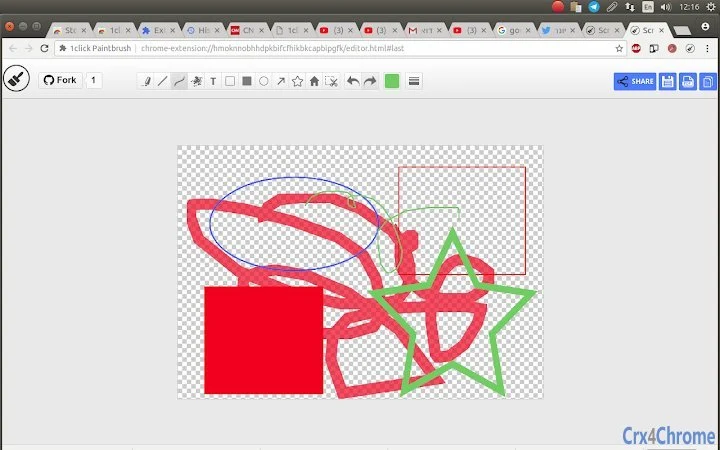
- Real-Time Drawing Tools – Offers intuitive drawing features such as freehand sketching, shape tools, and color selection for expressive visual creation.
- Multiple Export Options – Users can save creations as image files, PDFs, or copy them to the clipboard for immediate use in other applications.
- One-Click Sharing – Integrated sharing functionality allows users to distribute their artwork directly from the extension interface.
- Open-Source Transparency – The source code is publicly available, enabling independent verification of security and functionality.
- Privacy-First Design – No data is collected or stored by the extension. All content remains on the user’s device until they choose to share it.
These features support workflows where speed and simplicity are critical. For example, a teacher might sketch a quick diagram during a virtual class and share it instantly with students. A developer could illustrate a concept during a code review and send the visual for clarification. The extension’s lightweight nature ensures it does not interfere with browser performance, making it suitable for frequent use across multiple sessions.
User Interface, Workflow & Performance
The user interface is minimalistic and focused on core functionality. Upon activation, a compact canvas appears, offering essential tools such as a pencil, eraser, and color picker. Navigation is straightforward, relying on intuitive icons and context-sensitive controls. The workflow is designed for speed: install the extension, click the icon, draw, and export or share—completed in under a minute. The extension does not require background processes or additional dependencies, contributing to a smooth user experience. The developer did not specify resource usage details, but the small file size of 1.2 MB suggests low system impact. Performance observations are based on general software behavior patterns. Stability appears consistent due to the absence of external data collection and minimal permissions. The extension operates entirely within the browser environment, reducing the risk of crashes or conflicts with other applications.
Compatibility & System Requirements
The software is compatible with Windows, Mac, and Linux operating systems, ensuring broad accessibility across desktop platforms. It functions as a browser extension, requiring a modern web browser such as Chrome, Firefox, or Edge. The installation size is 1.2 MB, indicating a lightweight footprint. The developer did not provide additional system requirements, so exact hardware specifications remain unspecified. Compatibility information was partially provided, with support confirmed for major desktop operating systems. No mobile or tablet support was mentioned. Users should ensure their browser is up to date to maintain full functionality. The extension does not require administrative privileges for installation, making it accessible to users with limited system access.
Pros and Cons
Pros
- Lightweight at just 1.2 MB, ensuring fast installation and minimal resource use.
- Open-source nature promotes transparency and trust in security practices.
- Privacy-first approach with no data collection or storage.
- Simple, intuitive interface suitable for users of all skill levels.
- Quick creation and sharing of visual content without leaving the browser.
- Free to use with no hidden costs or subscriptions.
Cons
- Functionality is limited to basic drawing and export, lacking advanced editing tools.
- Dependent on browser availability and extension support.
- No offline mode or cloud sync features were specified.
- Platform compatibility is limited to desktop browsers, with no mobile support.
- Exact performance details were not provided.
FAQ Section
Is this extension safe to use?
Yes, the extension is open-source and does not collect or store any user data. All processing occurs locally on your device, ensuring privacy and security.
Can I use this tool offline?
The extension functions within the browser environment and does not require an internet connection for drawing or saving files. However, sharing features may require connectivity.
Is the software free?
Yes, the software is completely free to download and use. There are no premium tiers, subscriptions, or hidden fees.
What operating systems are supported?
The extension is compatible with Windows, Mac, and Linux desktop operating systems.
How do I update the extension?
Updates are managed automatically through your browser’s extension store. You will receive the latest version when available.
Final Thoughts
This browser extension delivers a fast, secure, and straightforward solution for creating and sharing visual content. Its open-source foundation, combined with a privacy-first design, sets it apart in a market where transparency is increasingly valued. While it lacks advanced features found in full-featured design tools, it excels in simplicity and speed. Ideal for educators, remote workers, students, and casual creators, it fills a niche for on-the-go visual communication. The seamless workflow and minimal system impact make it a reliable choice for quick tasks. For users seeking a no-frills, secure way to draw and share images directly from their browser, this tool offers a compelling solution. Download Create & Share Photos in Seconds now.
Guides & Tutorials for 1click Paintbrush Extension for Chrome
How to install 1click Paintbrush Extension for Chrome
- Click the Preview / Download button above.
- Once redirected, accept the terms and click Install.
- Wait for the 1click Paintbrush Extension for Chrome download to finish on your device.
How to use 1click Paintbrush Extension for Chrome
This software is primarily used for its core features described above. Open the app after installation to explore its capabilities.
User Reviews for 1click Paintbrush Extension for Chrome 0
No reviews found





